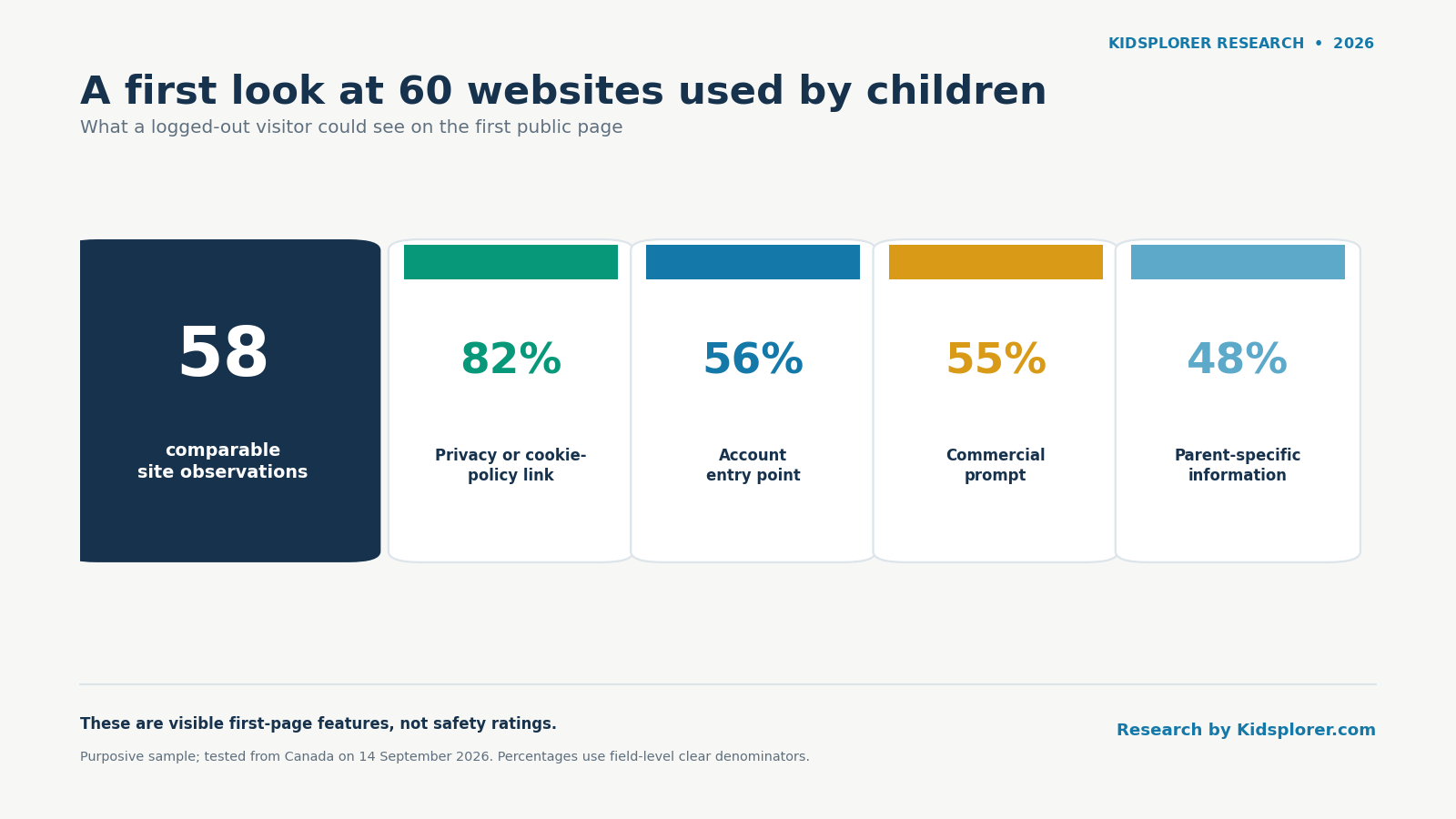
We opened 60 websites used by or recommended to children and recorded what a logged-out visitor could see on the first page. Among the 58 sites with comparable observations, 46 of 56 with a clear result showed a privacy or cookie-policy link, 32 of 57 showed an account entry point, 32 of 58 showed a commercial prompt, and 28 of 58 showed information intended specifically for parents or families.
Those numbers describe this sample on 14 September 2026. They do not tell us whether a website is safe, suitable for a particular child, or free from advertising or data collection. They also do not describe every page, app or logged-in experience.
Key statistics
- 60 websites used by or recommended to children, audited from Canada on 14 September 2026
- 82.1% showed a privacy or cookie-policy link
- 56.1% showed an account entry point
- 55.2% showed a commercial prompt
- Only 25.0% of visible cookie/consent dialogs offered a clear reject or essential-only control
Source: Kidsplorer Research, What Children See First: A 60-Site Audit, 2026.
What this audit does not measure
This is a first-page feature audit, not a safety or compliance review. It does not:
- inspect hidden network requests or trackers, only what a visitor can see on the page;
- determine legal compliance with any privacy or children’s-data law;
- classify any site as “safe” or “unsafe”; or
- test whether a child can use a site independently.
The full list of limitations appears later in this report.
The short version
Parents are often asked a simple question: “Can I use this website?” The answer usually requires more than knowing whether the site is described as educational.
| Finding | Result | Status |
|---|---|---|
| Privacy or cookie-policy link visible | 46 of 56 clear observations (82.1%) | Confirmed by the audit data |
| Account entry point visible | 32 of 57 clear observations (56.1%) | Confirmed by the audit data |
| Commercial prompt visible | 32 of 58 sites (55.2%) | Confirmed by the audit data |
| Parent-specific information visible | 28 of 58 sites (48.3%) | Confirmed by the audit data |
| Cookie or consent dialog visible | 20 of 58 sites (34.5%) | Confirmed by the audit data |
| Clear first-layer reject or essential-only control among visible cookie dialogs | 5 of 20 dialogs (25.0%) | Confirmed by the audit data |
| General-platform sites with an account entry point | 13 of 14 sites (92.9%) | Confirmed by the audit data |
The practical lesson is not that accounts, commercial links or outside links are automatically bad. It is that sites with similar child-friendly or educational descriptions can present very different starting experiences. A parent can make a more informed choice by looking at those features separately.
What we studied
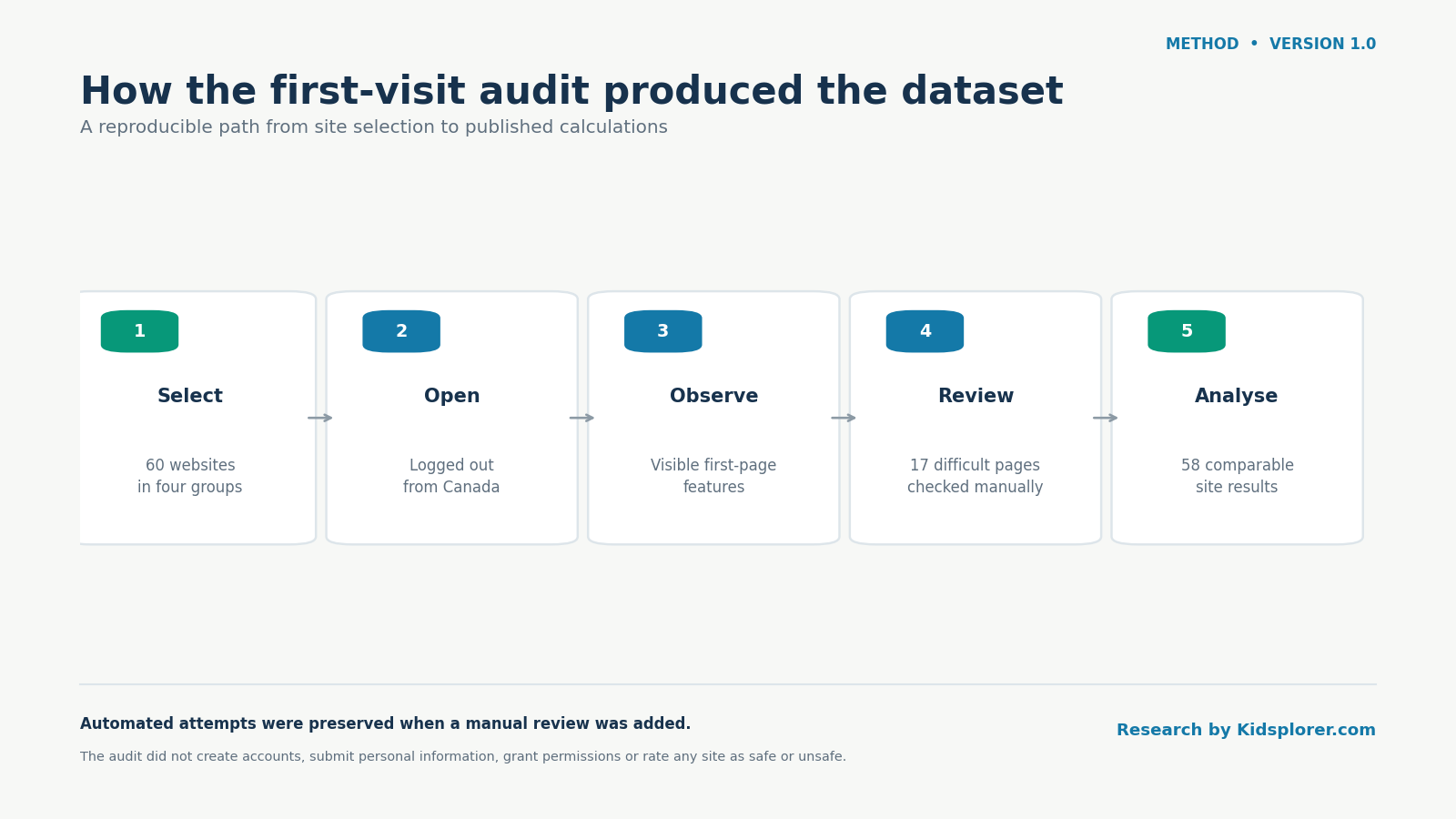
We selected 60 websites in four groups:
| Website group | Sites selected | Comparable observations | What the group represents |
|---|---|---|---|
| Canadian public | 15 | 15 | Canadian government, library, cultural, public-media and educational resources |
| Global education | 15 | 14 | Educational, literacy, coding and creative-learning services available in Canada |
| Entertainment | 15 | 15 | Child-oriented games, activities and major entertainment brands |
| General platforms | 15 | 14 | Search, video, gaming, reference, news and media services children may encounter |
| Total | 60 | 58 | One retired redirect and one unavailable site were excluded from feature rates |
This is a purposive sample: the sites were deliberately selected to cover different kinds of experiences. It is not a random sample of the web, and the percentages should not be treated as estimates for every children’s website.
The audit focused on the first public page. We recorded whether that page exposed:
- a sign-in, login, registration or account-creation path;
- information intended for parents, caregivers or families;
- a privacy or cookie-policy link;
- a subscription, purchase, upgrade, shop, membership or donation prompt;
- a visible cookie or consent dialog and the choices it offered;
- a visible label such as “Advertisement,” “Sponsored” or “Ad choices”;
- links to hostnames outside the page’s main domain; and
- links to recognizable social platforms.
We did not create accounts, submit forms, buy anything, click advertisements or grant device permissions. We also did not inspect private areas or attempt to bypass access controls.
Finding 1: Privacy links were common; parent information was not
Confirmed by the audit data.
A privacy or cookie-policy link was visible for 46 of the 56 comparable sites where the answer was clear, or 82.1%. A parent-specific information link was visible on 28 of 58 sites, or 48.3%.
These fields answer different questions. A privacy link usually leads to a legal or policy document describing data practices. A parent-information link is a page, section or pathway explicitly intended to help a parent, caregiver or family understand or use the service. A generic “About” or “Contact” link did not count as parent information.
| Group | Parent information | Privacy/cookie-policy link |
|---|---|---|
| Canadian public | 6/15 (40.0%) | 11/15 (73.3%) |
| Global education | 10/14 (71.4%) | 13/14 (92.9%) |
| Entertainment | 8/15 (53.3%) | 13/15 (86.7%) |
| General platforms | 4/14 (28.6%) | 9/12 clear results (75.0%) |
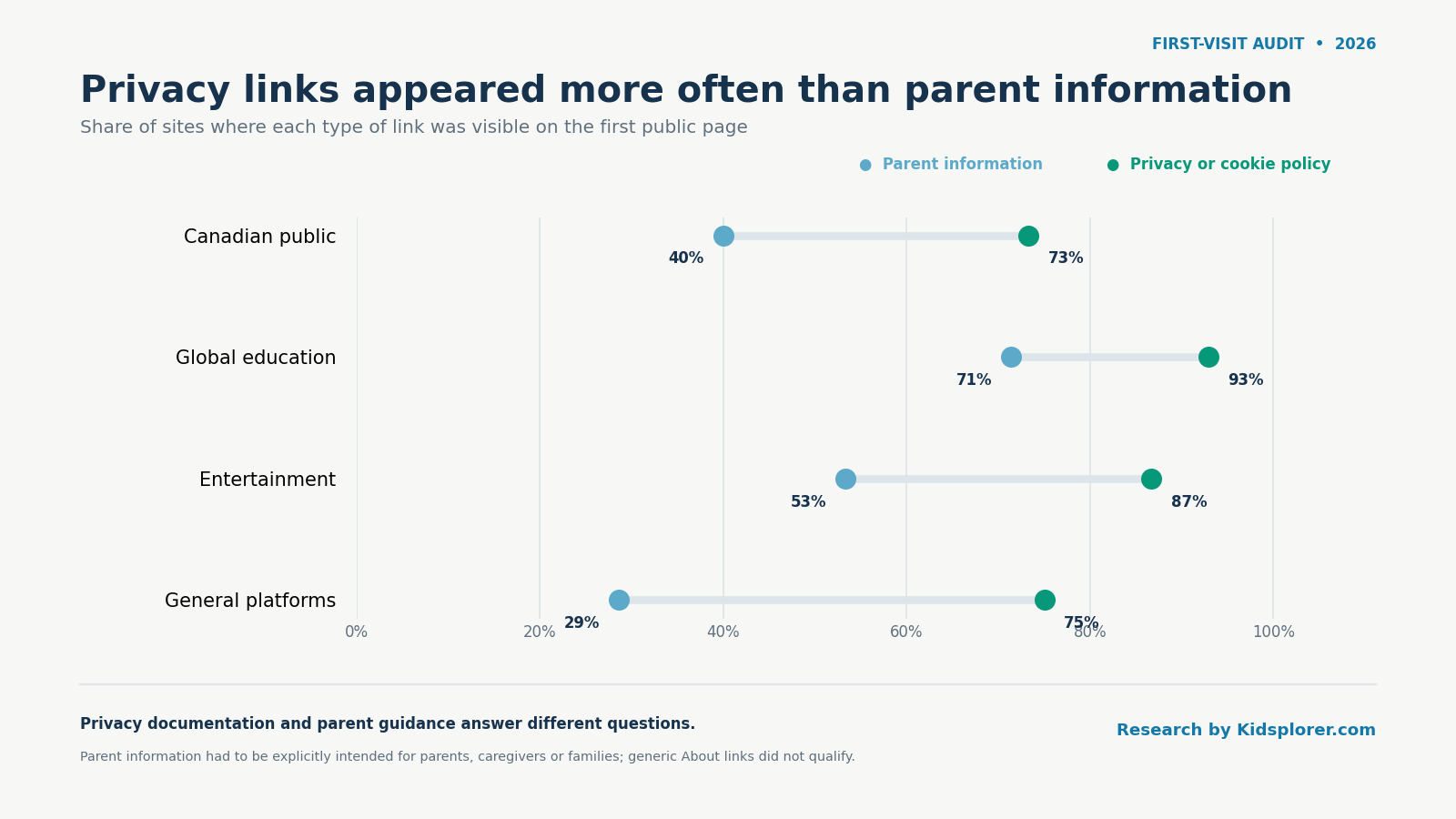
The difference matters because a policy link and practical parent guidance serve different purposes. A parent choosing a site for a six-year-old may want to know whether an account is needed, whether progress is saved, where a child can click next, and what settings require adult help. A privacy notice may contain some of that information, but it is rarely organized around the decision the parent is trying to make.
This audit did not assess the legal completeness of privacy policies or whether a parent would understand them. “Visible” means that a qualifying link appeared in the first-page material our test could examine. It does not mean that the policy was short, readable or written for children.
The category differences are descriptive. With only 14 or 15 comparable sites in each group, a few sites can noticeably change a percentage. The useful result is the broad pattern: finding a policy link was generally easier than finding guidance written for a parent.
Finding 2: Account entry points appeared on more than half the sites
Confirmed by the audit data.
An account entry point appeared on 32 of 57 sites with a clear answer, or 56.1%. One entertainment page used an unlabeled profile-shaped icon, so that observation remained Unclear and was excluded from the denominator.
An account entry point does not necessarily mean that a child had to create an account before doing anything. It means the first page visibly offered a path such as “Sign in,” “Log in,” “Join” or “Create account.” Determining whether an account was mandatory for every activity would require testing specific tasks and, in some cases, creating accounts. We did not do that.
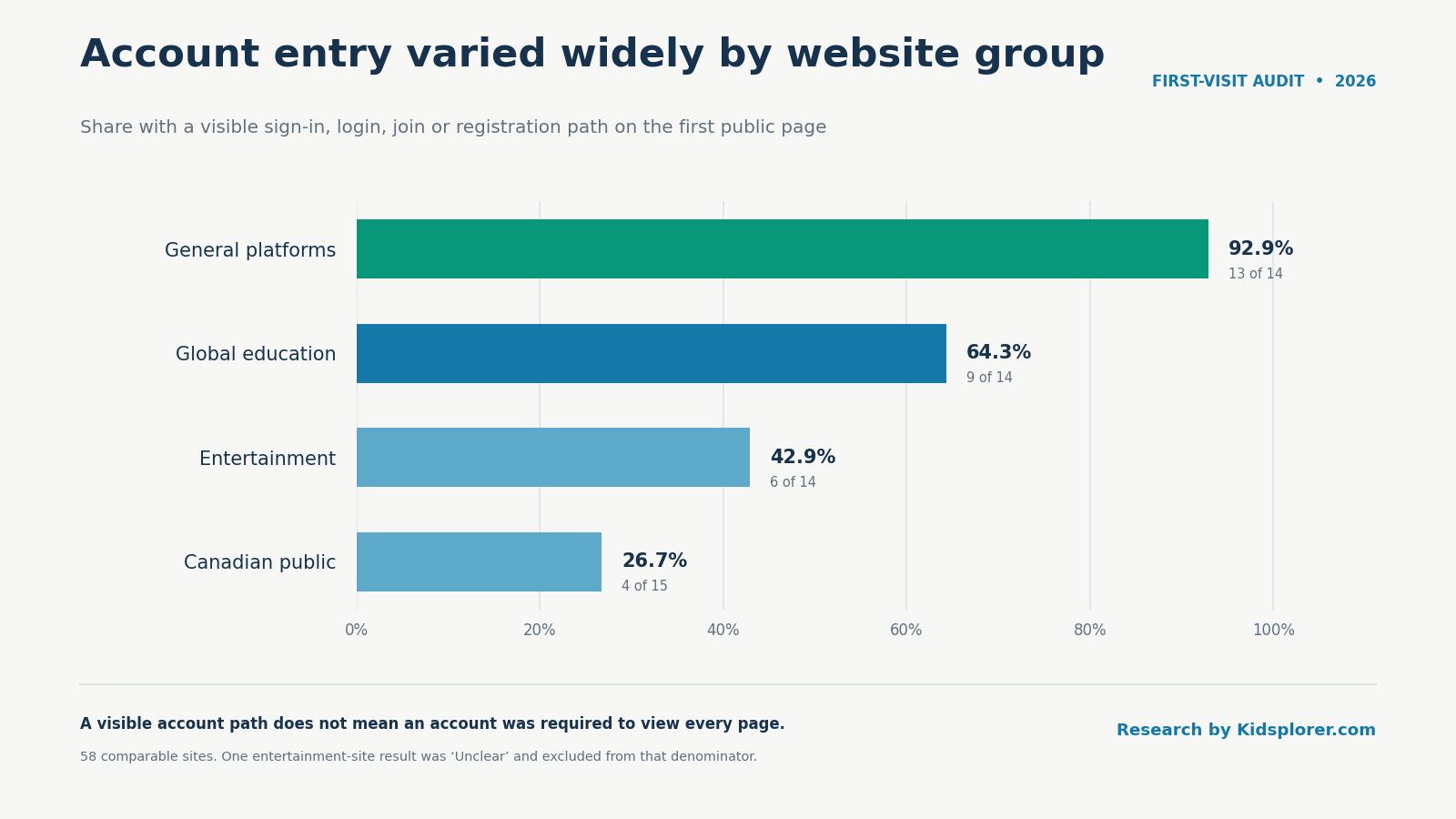
The largest contrast appeared between Canadian public sites and general platforms:
- Canadian public: 4 of 15, or 26.7%.
- Global education: 9 of 14, or 64.3%.
- Entertainment: 6 of 14 clear results, or 42.9%.
- General platforms: 13 of 14, or 92.9%.
This does not make the Canadian public group “better,” nor does it mean an account is inherently undesirable. Accounts can save work, synchronize progress, support classrooms, apply parental settings or provide accessibility features. They can also add setup steps and create decisions about names, email addresses, passwords, profiles and consent.
For parents, the useful question is more specific than “Does the site have accounts?” Ask what the account enables, whether a child can begin without one, who should create it, and what information is requested. A site used once to answer a homework question may not need the same setup as a learning service used every week.
YouTube Kids illustrates why these distinctions matter. In the manual review, its first page was a parent-setup gate rather than a public video feed. The page offered separate “I’m a kid” and “I’m a parent” routes. That is different from a conventional login link and should be understood as adult setup, not simply another account promotion.
Finding 3: Commercial prompts appeared on 32 of 58 comparable sites
Confirmed by the audit data.
We kept commercial prompts separate from advertisements. A commercial prompt included a subscription, premium plan, purchase, upgrade, shop, membership or donation request. A visible advertisement required a label such as “Advertisement,” “Sponsored” or “Ad choices.”
| Group | Commercial prompt observed |
|---|---|
| Canadian public | 6/15 (40.0%) |
| Global education | 8/14 (57.1%) |
| Entertainment | 12/15 (80.0%) |
| General platforms | 6/14 (42.9%) |
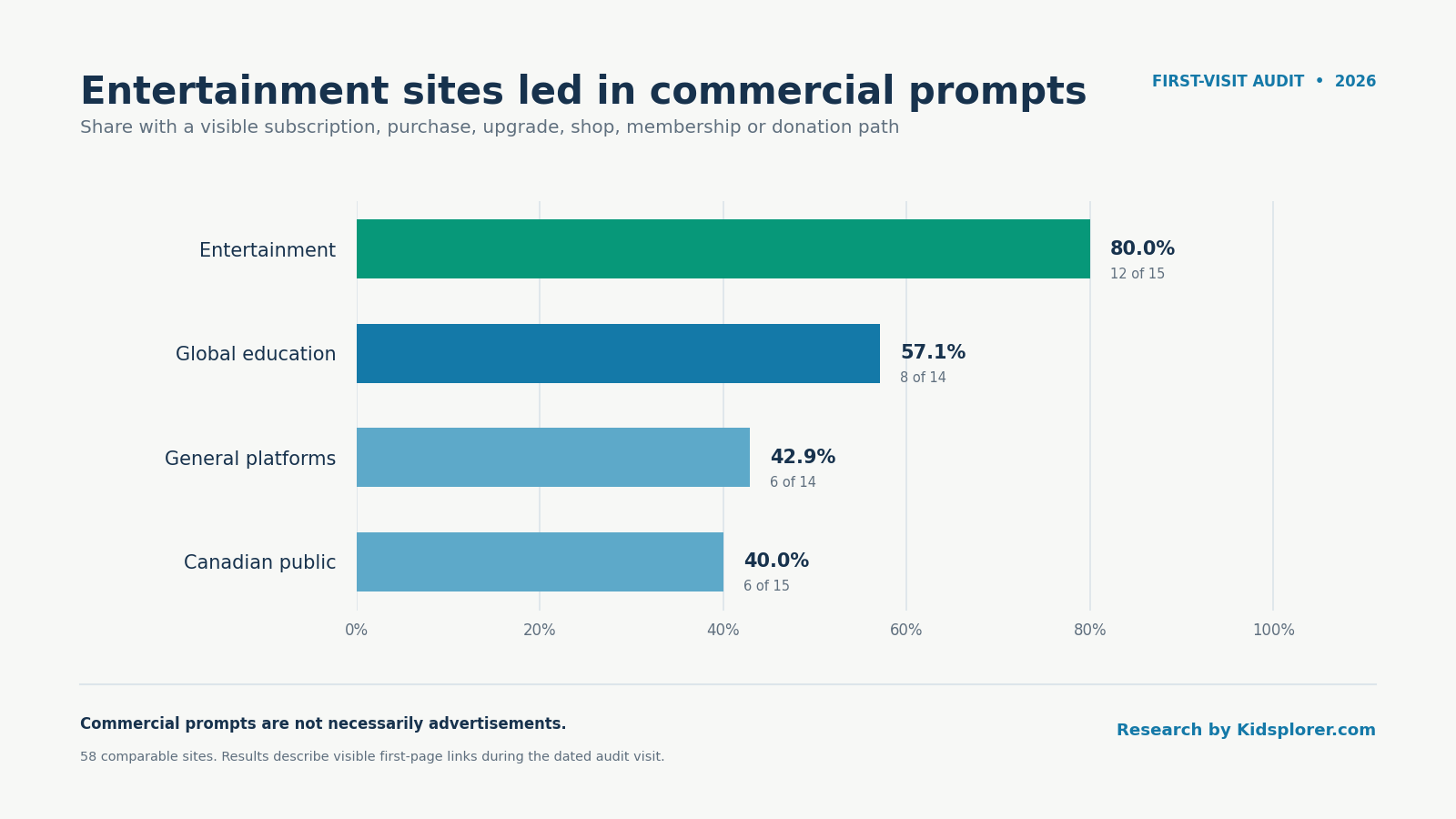
The broad definition is intentional. A charity donation link, an educational subscription and a toy-store link are not the same thing, but each tells a parent that the first-page experience includes a path away from the immediate activity and toward a financial decision.
The audit did not rate those prompts as manipulative, measure their visual prominence consistently across every site, or determine whether children and adults saw different versions. It records whether a qualifying prompt was visible.
The manual review also observed a Crayola newsletter pop-up after the regional selection screen. It requested a birthdate and email address in exchange for free colouring pages. Nothing was submitted. Because no screenshot was retained, this is treated as a dated manual observation rather than a headline statistic or claim about Crayola’s continuing behaviour.
Only two comparable pages, Funbrain and ABCya, showed one of the explicit advertising labels in our definition. This must not be read as “only two sites had advertising.” Ads can be personalized, loaded later, blocked by technical conditions, embedded without the labels we searched for, or absent during one visit. Our result is only that an explicit ad label was observed on 2 of 58 first pages.
Finding 4: Cookie dialogs differed in the choices they exposed
Confirmed by the audit data.
A visible cookie or consent dialog appeared on 20 of 58 comparable sites, or 34.5%. Thirteen presented a clear accept control, two offered an indirect or ambiguous acceptance path, and five did not expose an identifiable accept button in the first layer we observed.
| First-layer cookie control | Clear control | Partial/indirect path | No clear control | Total dialogs |
|---|---|---|---|---|
| Accept | 13 | 2 | 5 | 20 |
| Reject or essential-only | 5 | 2 | 13 | 20 |
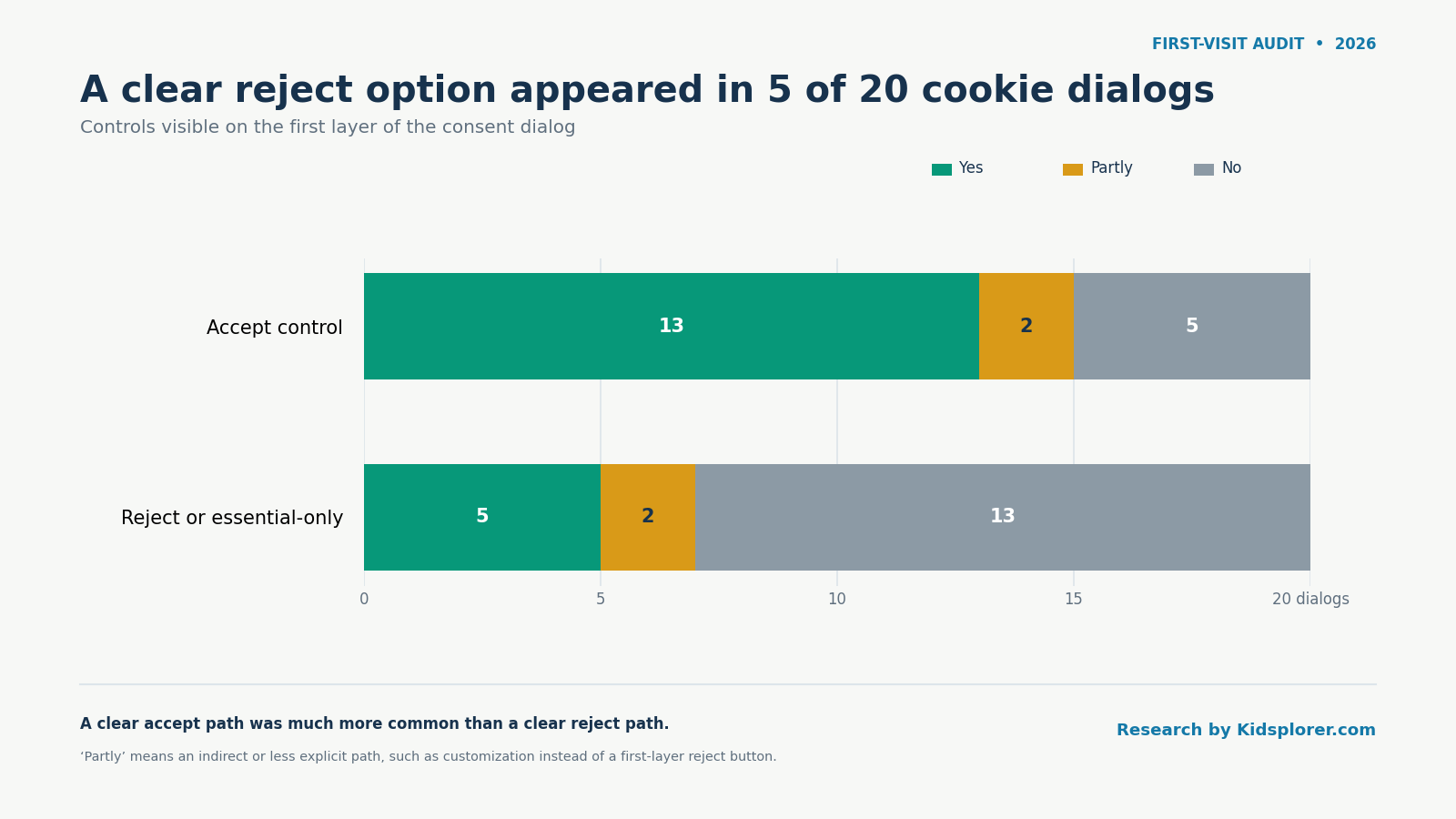
“Partial” means that some route was visible but it was not equivalent to a direct first-layer choice. Examples include a text link, a customization panel or dismissing a notice that treats continued use as consent. We did not click through every settings panel, so “no clear control” does not prove that rejection was impossible elsewhere.
A cookie is a small piece of information a website stores in the browser. Cookies can be used for necessary functions, such as remembering a setting, as well as analytics, personalization and advertising. The presence of a dialog does not tell us which purposes were active, whether the site complied with a particular law, or what data was collected.
Finding 5: Visible outside links were normal, but their number varied
Confirmed by the audit data, with count limitations.
We counted different outside hostnames visibly linked from the first page. A hostname is the recognizable web address used by a link, such as example.org. These are clickable destinations, not background network requests.
The median was three outside hostnames across the 58 comparable sites:
- Entertainment: 6.
- Global education: 3.5.
- Canadian public: 3.
- General platforms: 2.
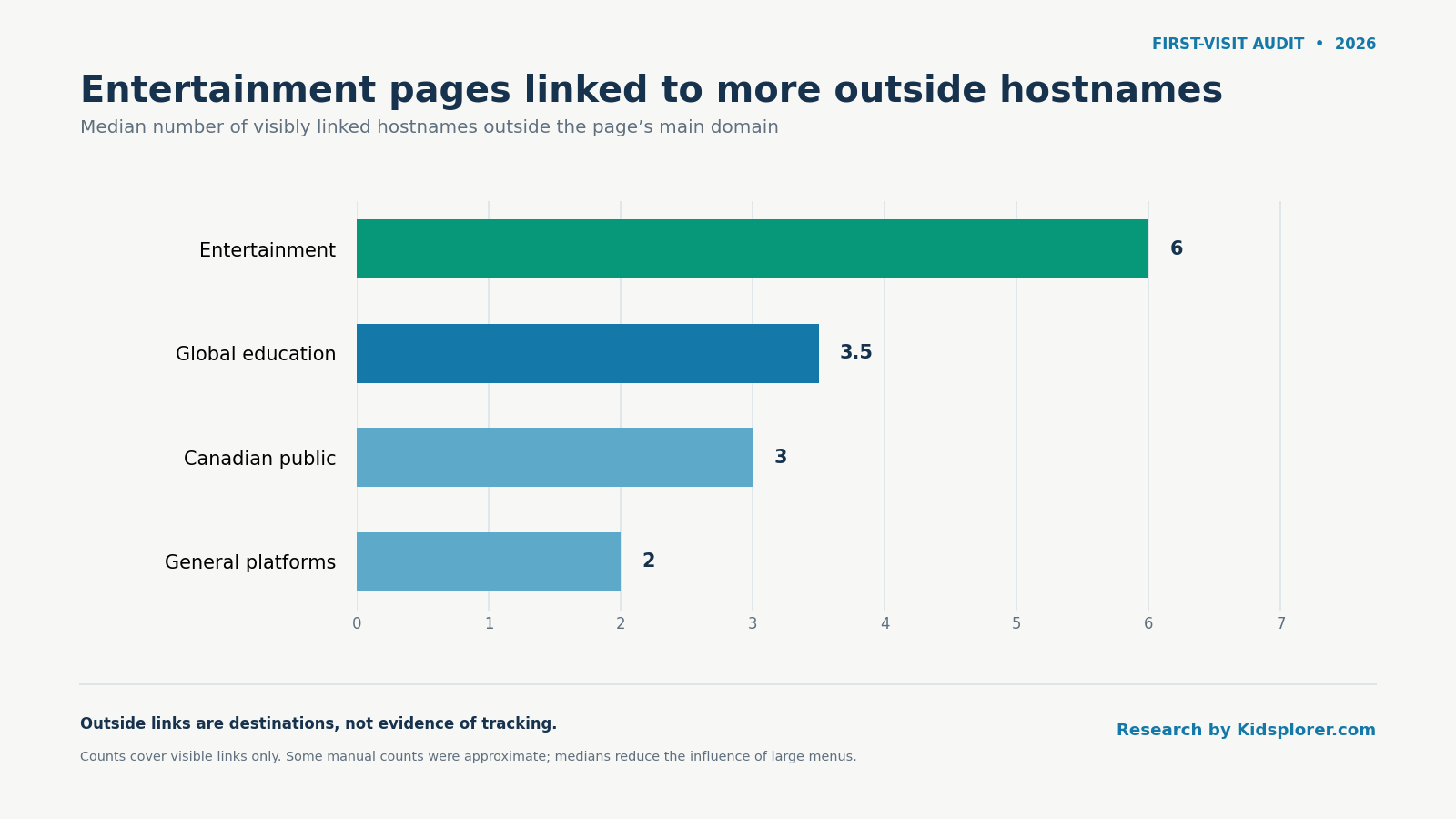
An outside link is not automatically a risk. It may lead to an app store, a museum, another government service, a help centre, a social account or a partner resource. Some organizations also use several domains for parts of the same service.
The count is useful because outside links can change the browsing boundary. A parent may approve one website believing that a child will remain there, while the page provides routes to stores, video platforms or other services with different rules.
These counts have two limitations. Automated pages were counted from visible document links, while the 17 difficult sites were manually reviewed. Large menus and government footers can also produce high counts that say more about navigation design than about a child’s likely route. We therefore emphasize medians rather than totals or rankings.
We did not measure third-party network requests or trackers in this release. Browser-visible links and background connections are different measures. Calling every outside connection a tracker would be inaccurate, and the controlled environment did not expose sufficiently reliable network-request data for publication.
Finding 6: No website category had one uniform profile
Confirmed by the audit data.
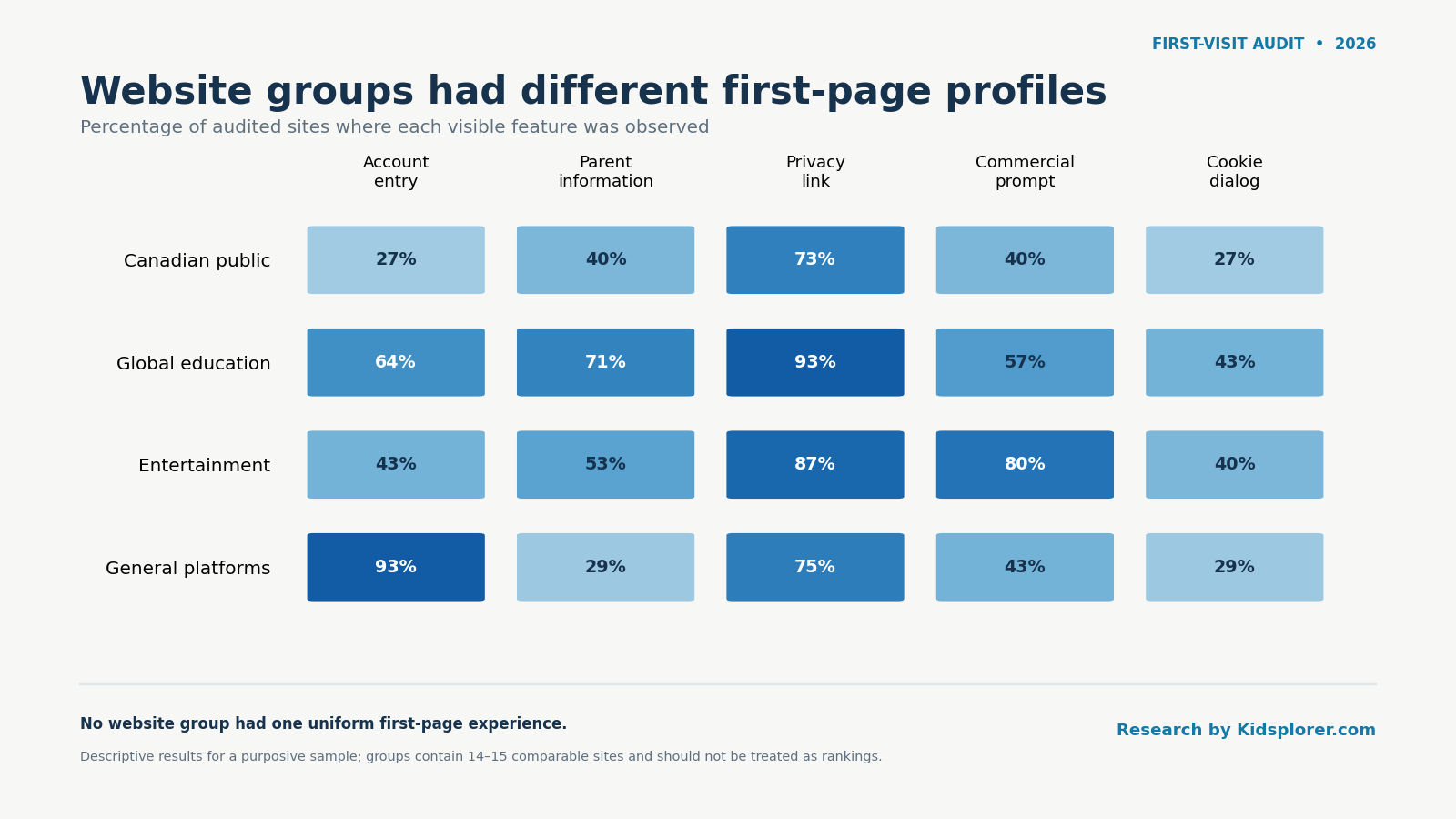
Some educational sites provided prominent parent routes and subscriptions. Others opened directly to activities. Some entertainment sites were child-specific microsites; others were brand or membership pages. General platforms often displayed login paths but differed sharply in parent information and commercial prompts.
That variation is the main reason not to reduce the audit to one score. A family may welcome an account on a long-term learning platform but avoid it for occasional browsing. A store link may be irrelevant for an older child who understands the boundary and important for a younger child who clicks colourful buttons impulsively.
Two exceptional site-status results also matter:
- Wonderopolis: the requested address redirected to a National Center for Families Learning announcement that the service was closing. We classified the sampled children’s site as retired and excluded the successor page’s features from rate calculations.
- KidRex: the address refused the connection on two manual attempts. We classified it as unavailable during testing, not permanently defunct.
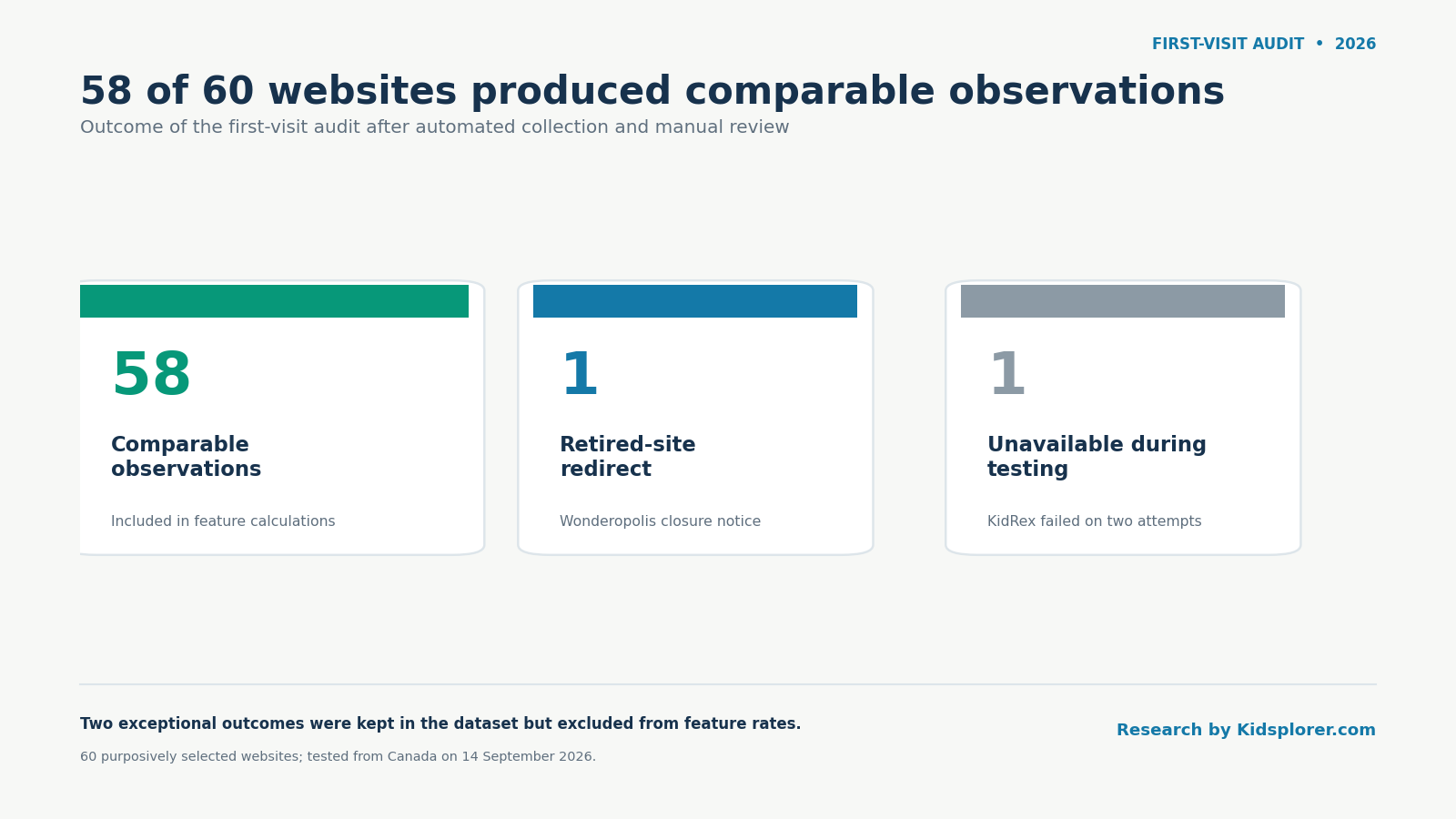
This status information is useful for libraries, schools and parent organizations that publish recommended-site lists. A link that once led to a child-oriented resource may later fail, redirect or lead to a materially different experience.
How parents can use the findings
The audit is a starting checklist, not a verdict.
Begin with the purpose
Ask what the child is expected to do. Watching one assigned science video, practising multiplication every day and freely exploring games are different activities. The same website may be reasonable for one purpose and frustrating for another.
Open the site while logged out
Look at the page your child will actually encounter. Check for sign-in buttons, pop-ups, stores, subscriptions, ads and links that leave the site. If an account is necessary, create or configure it yourself before handing over the device.
Follow one likely path
Try the activity the child will use. A calm homepage can lead to a broad search tool, public comments, an app store or a paid upgrade. Conversely, a prominent login button may be optional while useful public material remains available.
Decide what needs an adult
You may want to handle consent dialogs, accounts, purchases and device permissions yourself. Tell the child which buttons require help. A short family rule such as “Ask before signing in or entering information” is often easier to remember than a long list of technical warnings.
Recheck important sites
Websites change. Revisit frequently used sites after a redesign, ownership change or unexpected redirect. A parent-approved list is still a maintained list, not a permanent guarantee.
Four ways families manage web access
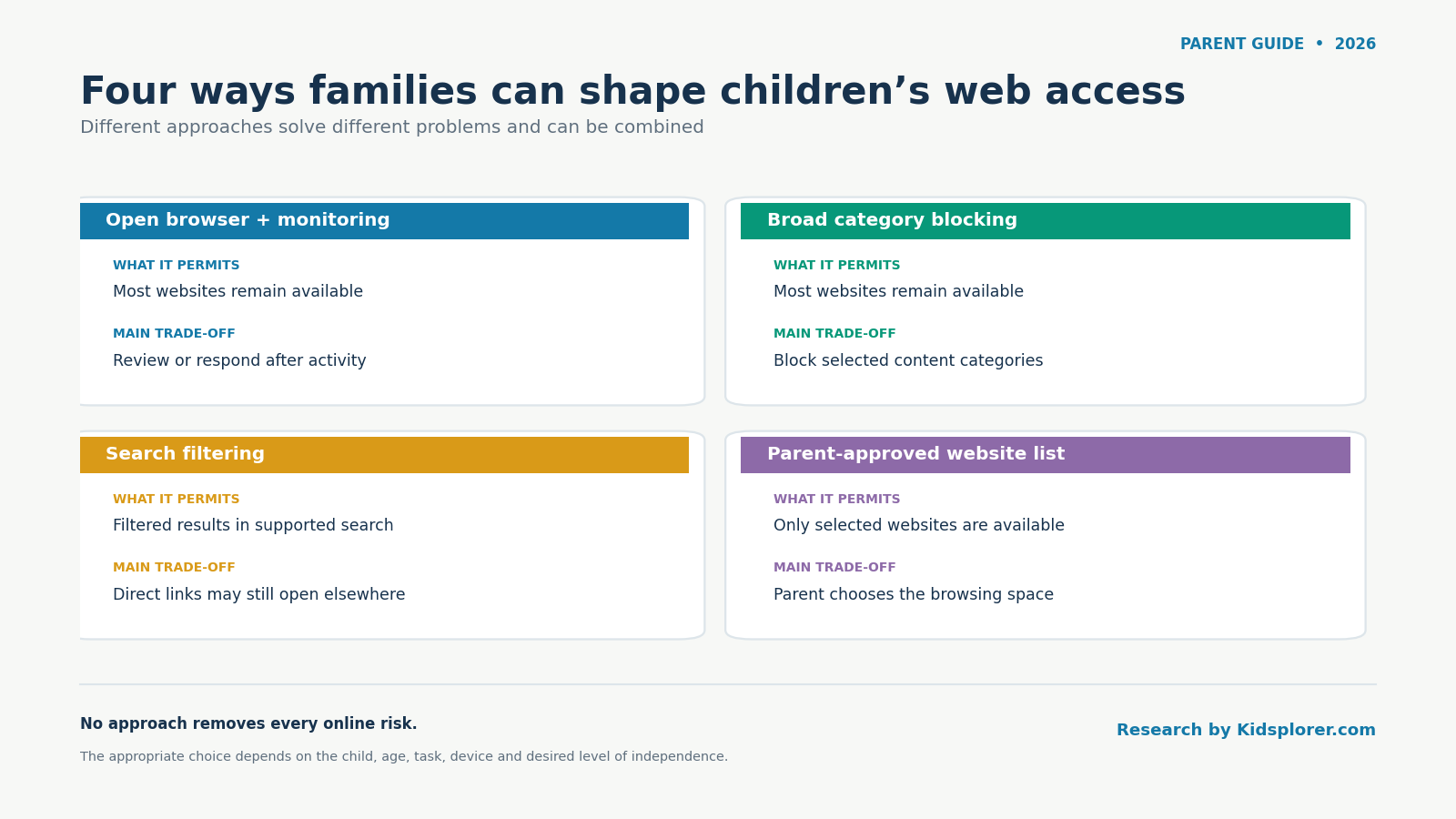
Families often combine several approaches:
- Open browsing with reactive monitoring allows broad access and reviews activity or responds after something happens.
- Broad category blocking permits most websites while attempting to block categories such as adult content or gambling.
- Search filtering limits what appears in supported search results but does not control every direct link or website.
- A parent-approved website list limits browsing to sites selected in advance.
Each approach solves a different problem. The appropriate choice depends on the child, age, purpose, device and desired level of independence. No browser setting or monitoring product can remove every online risk.
Explore and download the data
Use the explorer to filter by website group, collection method and observed feature. Exact values and method notes are included.
Explore the 60-site audit
Filter the first-page observations. “Yes” means the feature was visible during the recorded visit, not that it appears everywhere on the site.
| Website | Group | Status | Account | Parent info | Privacy link | Commercial | Cookie dialog | Visible ad label | Outside hosts | Method | Page |
|---|
Accessibility: all controls have text labels, the table is keyboard-scrollable, results do not depend on colour, and the article provides a static summary and direct CSV download.
If the explorer is unavailable, use this static table or download the files directly.
| Group | Comparable sites | Account entry | Parent information | Privacy link | Commercial prompt | Cookie dialog |
|---|---|---|---|---|---|---|
| Canadian public | 15 | 26.7% | 40.0% | 73.3% | 40.0% | 26.7% |
| Global education | 14 | 64.3% | 71.4% | 92.9% | 57.1% | 42.9% |
| Entertainment | 15 | 42.9% of 14 clear results | 53.3% | 86.7% | 80.0% | 40.0% |
| General platforms | 14 | 92.9% | 28.6% | 75.0% of 12 clear results | 42.9% | 28.6% |
Data Download
- Download the 60-site results CSV
- Download all 77 automated and manual observations
- Download the complete Excel workbook
- Download the calculated summary as JSON
- Download the data dictionary
Methodology
Selection
The sample was assembled before analysis. It contains 15 sites in each of four declared groups. Selection was informed by public children’s-resource lists and research showing that children use general services as well as explicitly child-oriented sites. Inclusion was not based on whether a site worked with Kidsplorer, and no included website paid for placement.
The four groups provide useful descriptive comparisons, but they are editorial classifications rather than natural populations. Some services could reasonably fit more than one group.
Automated collection
The initial test used a current Chromium-based controlled browser from Canada on 14 September 2026. Pages were opened while logged out. After the page settled, the collector examined publicly visible page text, controls and links.
A page entered the automated analysis only when it loaded successfully and exposed at least 20 readable words. Forty-three pages met that gate. Seventeen were routed to manual review because the controlled browser blocked the site, returned a blank or highly scripted page, or exposed too little readable text.
The collector used conservative text and link patterns to identify visible account entry, parent information, privacy links, commercial prompts, consent dialogs, ad labels, outside links and social links. These rules can miss icon-only or dynamically rendered elements.
Manual review
The 17 difficult pages were revisited in a regular Chrome browser. The reviewer was logged out of the tested sites and reported that autofill and ad blocking were not used. A true Incognito window and full-page screenshot extension were unavailable. The reviewer waited approximately five seconds, recorded the final URL and completed the same first-page fields.
Viewport captures were reviewed during the session but were not retained as image files. Manual findings therefore carry a lower evidence level than a retained screenshot. The article uses them in transparent descriptive totals, but it does not use dynamic examples as unsupported claims about continuing site behaviour.
The manual observations did not overwrite the automated attempts. The observation file contains all 60 automated records plus 17 manual records. The site-results file selects the usable observation for each sampled site.
Analysis rules
Feature rates use:
| |
Unclear, Partly and Not applicable responses are shown but excluded from binary feature denominators. This is why some denominators are smaller than 58.
The category median for visibly linked outside hostnames is the middle value after sorting the available counts. For an even number of observations, it is the average of the two middle values.
We report percentages to one decimal place in detailed results and round them in chart annotations where space is limited. We provide the numerator and denominator near major percentages.
No confidence intervals or statistical-significance tests are reported. Because the sites were purposively selected rather than randomly sampled, such calculations would create an unjustified impression of population inference.
Quality checks
The final dataset was checked for all 60 site identifiers, one selected result per site, preservation of original automated attempts, a manual record for every page routed to review, explicit retired/unavailable statuses, field-level denominators, agreement between charts and tables, and removal of tracker or child-usability claims the evidence could not support.
Important limitations
- The results describe first pages tested from Canada on one date.
- The sample is purposive and does not represent every site children use.
- Logged-in pages, apps and deeper routes may differ substantially.
- Advertising, recommendations and consent interfaces can vary by location, time, browser history and account state.
- “No visible ad label” does not mean “ad-free.”
- A visible account path does not prove that an account is mandatory.
- A visible outside link does not prove tracking or harmful data collection.
- Large menus can inflate outside-link counts.
- Seventeen pages were manually reviewed under a documented browser-state deviation.
- Manual viewport screenshots were not retained.
- This release does not test whether real children can use a site independently.
- The study does not evaluate legal compliance or classify sites as safe or unsafe.
Next step for parents
If you are choosing a site for your own child, see our checklist, how to choose educational websites for kids .
Definitions
Account entry point: A visible sign-in, login, join, registration or account-creation route. It may be optional.
Commercial prompt: A visible subscription, purchase, premium, upgrade, membership, store or donation route. It is broader than advertising.
Cookie: A small piece of information stored by a website in the browser. Cookies can support necessary functions, measurement, personalization or advertising.
Cookie dialog: A visible notice or control concerning cookies, consent or data-processing choices.
First page: The public page reached from the declared sample URL after ordinary redirects and a short settling period.
Outside hostname: A visibly linked web hostname different from the page’s primary hostname. It is not a count of background connections.
Parent information: A visible link or route explicitly intended for parents, caregivers or families.
Purposive sample: A set selected deliberately to cover relevant types, rather than randomly to estimate an entire population.
Visible ad label: First-page text such as “Advertisement,” “Sponsored” or “Ad choices.” Its absence does not establish that advertising was absent.
Updating the resource
The same 60 site identifiers should be retained for the next annual release unless a site closes, redirects permanently or becomes irrelevant. Any replacement should be documented rather than silently substituted.
For each update:
- Run the same first-page protocol from Canada while logged out.
- Send blocked, blank or low-text pages to manual review.
- Retain both the earlier and new observations.
- Compare only fields whose definitions and protocol remain unchanged.
- Publish a dated release folder and correction note.
- Recalculate charts from the released data rather than editing labels manually.
High-change sites and any unavailable address can be checked after six months. A later release could add repeatable network-request measurement, task-based account barriers or child-facing readability, but those should be new protocol modules rather than retroactive claims about this dataset.
Corrections policy
Readers can report a suspected coding error, broken download or changed website through the Kidsplorer research contact route. Corrections should preserve the original release, identify the affected site and field, explain whether the issue was an audit error or a later website change, and publish the corrected value with a new lastmod date.
About this research
Kidsplorer publishes this research because it builds a parent-controlled browser based on approved websites. The analysis and downloadable data are provided openly so readers can examine the findings independently. Inclusion and results do not depend on whether a website works with Kidsplorer or has a commercial relationship with Devicode Software.
How to cite this research
Kidsplorer Research (2026). What Children See First: An Audit of 60 Websites. https://kidsplorer.com/blog/childrens-website-privacy-audit/
Questions about the 60-site audit
Does a visible privacy or cookie-policy link mean a children's website is safe?
If a site shows a sign-in or account button, does a child have to create an account to use it?
Does the lack of an 'Advertisement' label mean a page is ad-free?
Can these percentages be used to estimate how all children's websites behave?
Sources and further reading
- MediaSmarts: Young Canadians in a Wireless World Phase IV, Life Online
- MediaSmarts: Phase IV research methods
- Ofcom: Children and Parents Media Use and Attitudes 2025–6
- Ofcom: Children’s Passive Online Measurement
- Targeted and Troublesome: Tracking and Advertising on Children’s Websites
- Internet Safety Labs: 2022 K–12 EdTech Safety Benchmark
- Common Sense: Privacy Evaluation Framework
- W3C Web Content Accessibility Guidelines 2.2
- U.S. Federal Trade Commission: Children’s Online Privacy Protection Rule
- UK Information Commissioner’s Office: Children’s Code